
Pràctica · Guia pas a pas
🔴-Mobile synchronization of email and chat
Now we will set up chat and email synchronization on the mobile phone; the chat is useful when we have questions or need to share information with students or teachers, allowing us to discuss matters quickly and efficiently. This fits perfectly into our cycle, because the questions arise very frequently, and it offers an efficient way to resolve them. To synchronize them, we first need to add our Gmail account to the mobile device. First, search for Gmail in the search bar.
Eines
Gmail
Nivell
Must
Pas 01
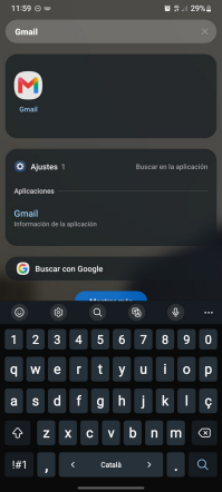
1.- Search for Gmail
To synchronize them, we first need to add our Gmail account to the mobile device. First, search for Gmail in the search bar.
Pas 02
2.- Open the profile menu
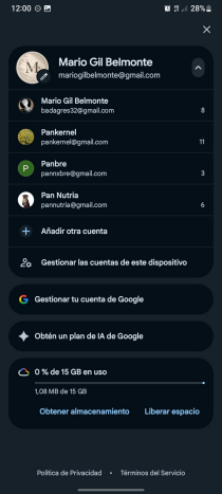
Once opened, go to the profile button on the right.
Pas 03
3.- Add your account
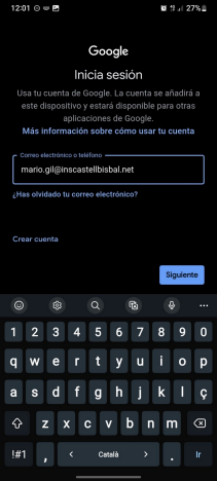
Then, if you haven’t added an account yet, at the bottom it says: add account. Then enter the email address you want to add.
Pas 04
4.- Enter your password
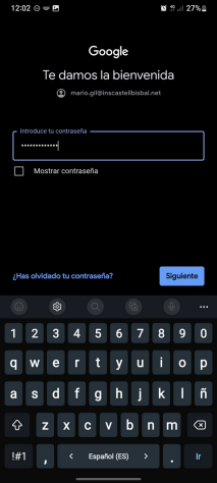
One of the final steps is to set your private password, which you will need to remember later.
Pas 05
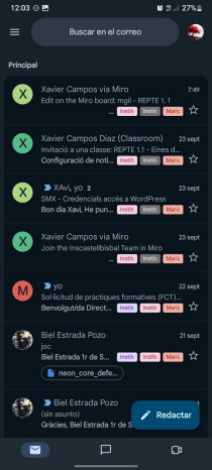
5.- Check your inbox
And once all these steps are complete, you will be logged into your account, where you will have synchronized the chat and email from your computer.
Què he après
This ensures that, once synchronized, both services and devices have the capacity to communicate any information.
Parlem?
Escriu-me o truca’m si vols saber més sobre les meves pràctiques.
Contacta’m
Sobre mi
Mario Gil Belmonte
Estudiant de 1r de SMX a l’Institut Castellbisbal.
Idiomes
Castellà, català i anglès
Contacte
mariogilbelmonte@gmail.com
671 620 436